Read the Google page, and why its numbers lag
The Google page shows your clicks, positions and what moved in Google search, with everything CitedSEO shipped marked on it. Its newest days are still filling in.
Written By Damian
Last updated About 2 hours ago
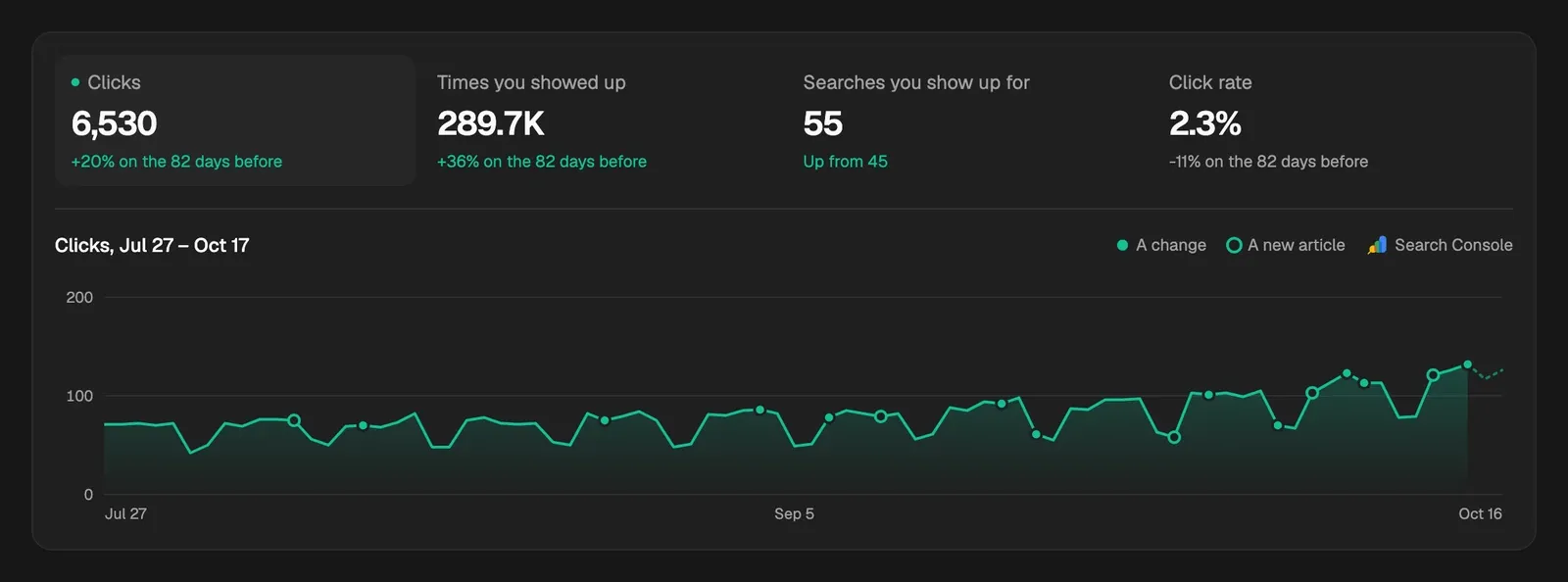
The Google page shows how your site does in Google search: clicks, how often you showed up, your positions and which pages moved, with every change and new article CitedSEO shipped marked on the chart. Its numbers come from Search Console, which runs about two days behind, so the last few days on the chart are still coming in and grow as Google finishes counting them.
Why the newest days are low
Google takes a few days to finish counting a day's searches and clicks. CitedSEO reads Search Console once a day and reads each unfinished day again until Google says it's done. On the chart, those days are drawn as still coming in: point at one and it says Still coming in.

So a dip in the last two or three days is usually Google still counting, not a drop. Settings › Search & analytics shows Numbers to the last day Google has finished. Days are Google's own, in Pacific time, so they can start and end at a different hour from yours.
The chart
Pick a date range at the top right, from Last 7 days to Since you joined, or your own dates. Then pick one of four numbers:
Each is compared with the same number of days just before. On a young site the page opens on Searches you show up for, which usually grows before clicks do. A dot on the chart is A change and a ring is A new article: point at one to see what shipped that day.
The rest of the page
- Pages moving up: the pages gaining clicks, each marked Written or Changed when CitedSEO did that work. A page losing clicks only shows here with its fix already queued.
- Where you rank: how many searches you show up for in the Top 3, the Rest of page one, Page two and Further back, one bar a week.
- Click rate for your position: searches where people see you but click less than usual for that spot. When a new title is queued for one of your articles there, the chart says so.
- Top of your site: your top Searches or Pages by clicks, with the change, how often each was seen and its position.
Some parts wait for enough data. Pages moving up shows once Google sends 20 clicks in the range, and Click rate for your position once you show up for 30 searches with clicks. Until then, More to come as Google gets to know your site says what's still to come.
The Search Console button opens Google Search Console itself.
Related
Was this helpful?
Still need help? Share an idea