Set your brand voice
How your articles sound is set in Settings › Brand. CitedSEO writes every article to it and checks each one against it.
Written By Damian
Last updated About 2 hours ago
Your brand voice is in Settings › Brand, under Voice. CitedSEO writes every article to it and checks each one against it before it can go live. When you add your site, CitedSEO reads your pages and fills it in for you, so most of the time you only need to check it, change what's off and press Save changes.
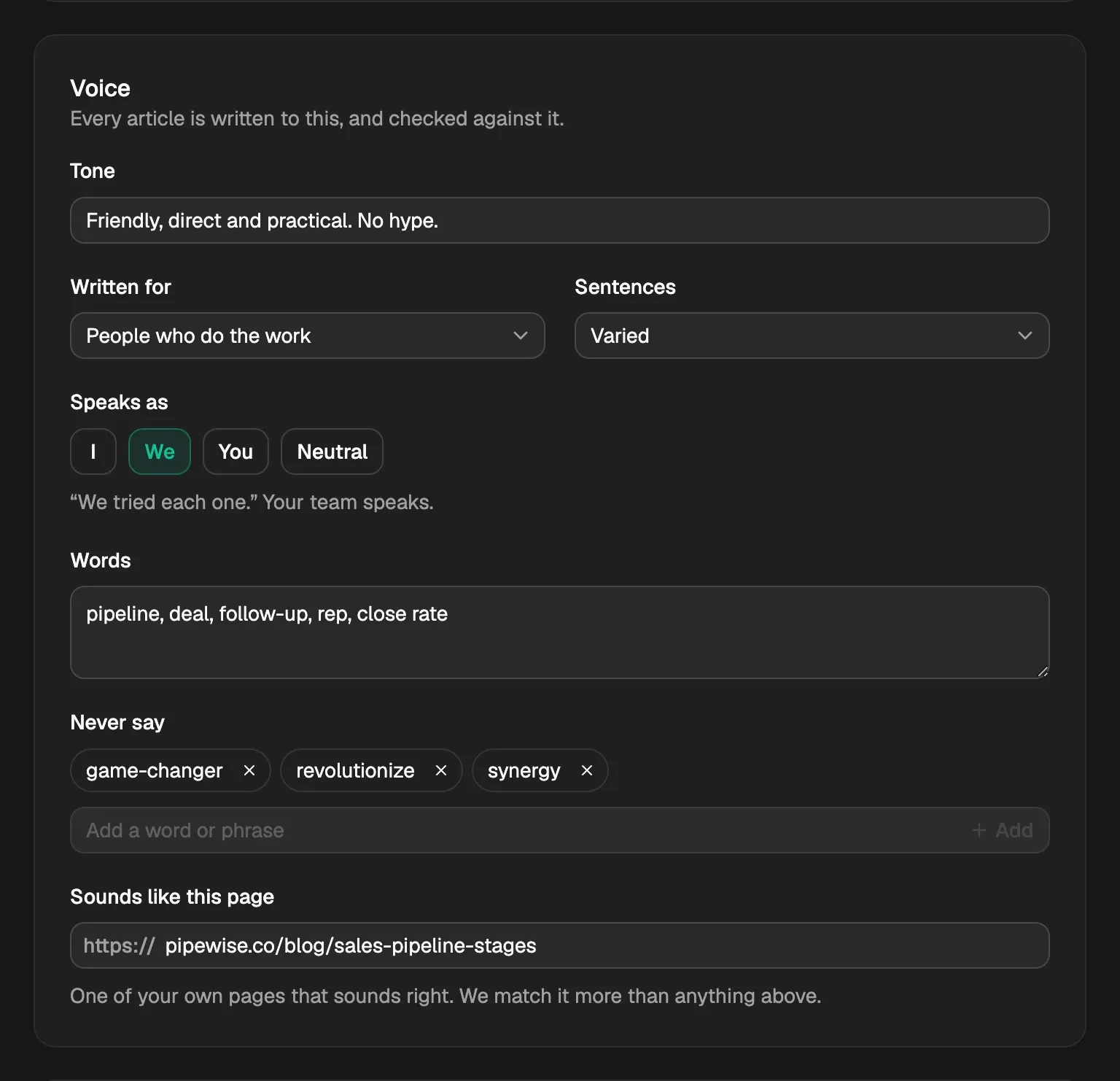
The fields
A badge at the top, Read from your site on and a date, shows CitedSEO filled in the page from your site. Reading your site again later never writes over a field you changed.
How it's checked
Two of the checks every article goes through come from here. You'll find both under Checked before publishing on the article page:
- Sounds like you: whether the article matches your tone, and the words you use and avoid. A miss gets one try at a fix.
- None of your “never say” words or AI stock phrases: your Never say list, plus stock phrases AI writing leans on, read in the title and search snippet as well as the article. One found stops the article until it's taken out.
What you save applies to the writing and checks CitedSEO does from then on.

The rest of Brand
- Your name: every way people write your name. An AI answer using any of them counts as a mention.
- Look: your Main colour, Second colour and Image style, used for covers and images in articles.
Related
Was this helpful?
Still need help? Share an idea